Access Control Softwares (677)
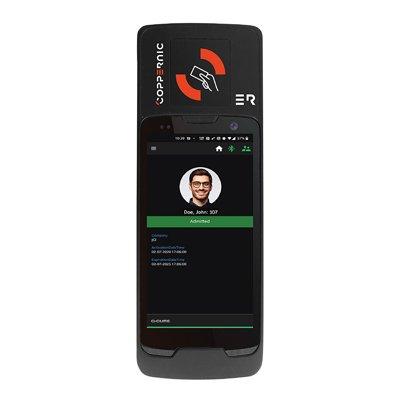
Powerful, portable C•CURE 9000 security on an Android device Supports iSTAR controller functionality – grant or deny access based on card status, schedules, clearances, holidays Roll call feature makes sure emergency evacuations run smoothly All activity logged in the C•CURE 9000 journal Can operate in offline mode with cached database Multi-technology read head supports iCLASS, MIFARE and Prox cards Available for free on Google Play for Android devices
Add to Compare
Powerful, portable C•CURE 9000 security on an Android device Supports iSTAR controller functionality – grant or deny access based on card status, schedules, clearances, holidays Roll call feature makes sure emergency evacuations run smoothly All activity logged in the C•CURE 9000 journal Can operate in offline mode with cached database Multi-technology read head supports iCLASS, MIFARE and Prox cards Available for free on Google Play for Android devices
Add to Compare
In a world increasingly overwhelmed by data, security operations are not exempt. Large enterprises can find themselves submerged in hundreds of millions of alarms annually – an avalanche of information beyond the management capabilities of any team. This can lead to critical events getting buried, directly impacting business operations and overall security. C•CURE IQ Security Intelligence addresses this exact challenge, built exclusively for C•CURE IQ browser-based client. Sifting through the vast amount of data and ensuring only the vital alarms are prioritized. By delivering discernible outcomes, Security Intelligence dramatically elevates operational efficiency and reduces the time taken to respond to pivotal events.
Add to Compare
In a world increasingly overwhelmed by data, security operations are not exempt. Large enterprises can find themselves submerged in hundreds of millions of alarms annually – an avalanche of information beyond the management capabilities of any team. This can lead to critical events getting buried, directly impacting business operations and overall security. C•CURE IQ Security Intelligence addresses this exact challenge, built exclusively for C•CURE IQ browser-based client. Sifting through the vast amount of data and ensuring only the vital alarms are prioritized. By delivering discernible outcomes, Security Intelligence dramatically elevates operational efficiency and reduces the time taken to respond to pivotal events.
Add to Compare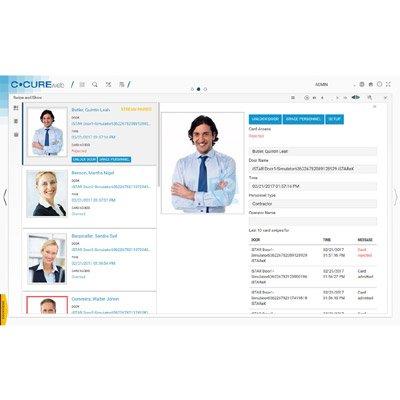
Health diagnostics dashboard provides intuitive snapshot of system performance over the last 7 days Support for User Defined Fields (UDF) to customise Personnel information Swipe and Show allows operator to visually confirm card holder Monitor all activity of Personnel to detect unusual behaviour Easily search by name to lookup card holder Provides access to C•CURE 9000 from any computer or mobile device with an Internet browser Manage personnel and their photos, display dynamic views, and monitor system activity Activate/deactivate, acknowledge, and log messages on events Lock/unlock and momentarily unlock doors View journal history and audit trail activity Intuitive icon-driven user interface TSL secure communication to server
Add to Compare
In a world increasingly overwhelmed by data, security operations are not exempt. Large enterprises can find themselves submerged in hundreds of millions of alarms annually – an avalanche of information beyond the management capabilities of any team. This can lead to critical events getting buried, directly impacting business operations and overall security. C•CURE IQ Security Intelligence addresses this exact challenge, built exclusively for C•CURE IQ browser-based client. Sifting through the vast amount of data and ensuring only the vital alarms are prioritized. By delivering discernible outcomes, Security Intelligence dramatically elevates operational efficiency and reduces the time taken to respond to pivotal events.
Add to Compare
Real-Time Insight: Your lens to instant, actionable security intelligence through comprehensive dashboards and reporting Alarm Intelligence: Rules Engine and Dynamic Risk Score for alarm noise reduction and prioritization Spatial Intelligence: Data-driven insights to safeguard people and optimize space utilization Utilization Analytics: Occupancy and attendance data to help organizations make informed business resource decisions Geospatial Awareness: Interactive map to present a holistic and real-time overview of all occupants Operational Efficiency: Sideline redundant alarms and spotlight critical ones to streamline security workflow
Add to Compare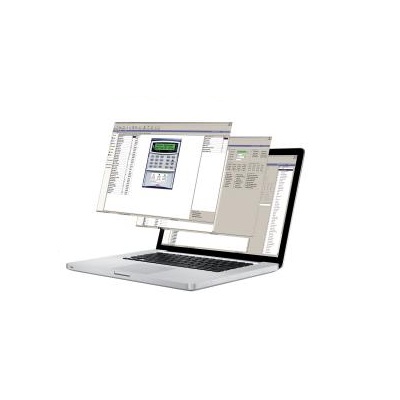
In a world increasingly overwhelmed by data, security operations are not exempt. Large enterprises can find themselves submerged in hundreds of millions of alarms annually – an avalanche of information beyond the management capabilities of any team. This can lead to critical events getting buried, directly impacting business operations and overall security. C•CURE IQ Security Intelligence addresses this exact challenge, built exclusively for C•CURE IQ browser-based client. Sifting through the vast amount of data and ensuring only the vital alarms are prioritized. By delivering discernible outcomes, Security Intelligence dramatically elevates operational efficiency and reduces the time taken to respond to pivotal events.
Add to Compare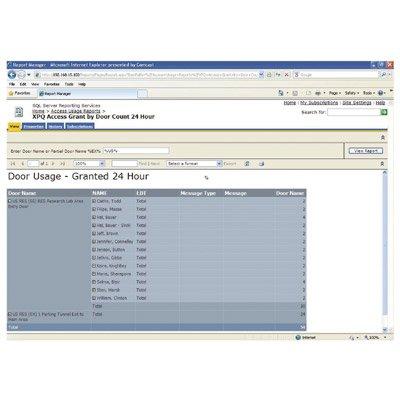
Intuitive user interface and web-based reporting for C•CURE customers Share and blend data from other sources to yield critical business information Leverages Microsoft® Business Intelligence (BI) tools Utilises the latest Microsoft SQL databases for the latest features and technology and SQL Reporting Service for report delivery and presentation Time interval synchronised replication of C•CURE 800/8000 database and journals to provide data warehouse shared with other applications Reporting and processing can be performed from the C•CURE host Web access and email delivery options Subscription options for automated delivery of reports Dashboard, graphical, and statistical reports, and reports customised by user Users can subscribe to reports for delivery (requires SQL Reporting Services) Reports generated by any PC with compatible Web browser without C•CURE Client software Data offered and secured via Active Directory and SQL permissions Optional front end or other application integration including SharePoint
Add to Compare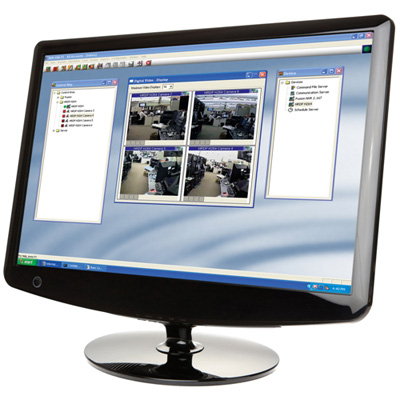
WIN-PAK combines access control, digital video and intrusion into one powerful system that improves scalability, capability and control of your security solution. WIN-PAK can be used to programme, operate and report access control events and is available in standard and professional editions: WIN-PAK SE 2.0 Single user (Standard Edition) with basic video integration: The single user software supports advanced access control and basic video including Rapid Eye, Fusion or HRDP Series DVRs. Depending on the application, choose Galaxy integration as an option.WIN-PAK SE 2.0 Five user (Standard Edition) with advanced video integration: The five user software supports advanced access control including advanced video support for Fusion and HRDP Series DVRs. Depending on the application, choose Galaxy integration as an option.WIN-PAK PE 2.0 (Professional Edition): The unrestricted user software supports advanced access control, including advanced video including Rapid Eye, Fusion or HRDP Series DVRs and Galaxy integration.Functions that have traditionally been tied together through physical relays and input devices are now controlled logically. Full-scale system management of single or multiple locations is possible - you can move, control or share resources across multiple locations simply by logging on to a system.WIN-PAK is easy to install and programme using Quick Start Wizards, which also offer advanced reporting capabilities that customers are demanding. Users can create customised reports or choose from a variety of predefined reports. E-mail capability has been added to allow reports and events to be sent via e-mail. Reports and events can be shown as easy-to-read text that provide all the content and detail that customers require.WIN-PAK SE/PE 2.0 offers complete enhanced Digital Video Integration to Honeywell Rapid Eye, Fusion and HRDP "Performance Series" Digital Video Recorders. Integration allows video to be linked to both access control and Galaxy intrusion events and alarms. Video clips can easily be recalled through the software, based on time or event. With integration, users can have complete camera control, including pan, tilt and zoom, and can verify live users with stored images using the video verification option.Integration with Honeywell Galaxy intrusion panels allows multiple Galaxy panels to be managed by WIN-PAK SE/PE, using floor plans and control maps to allow easy monitoring and control of most of the Galaxy functionality.
Add to Compare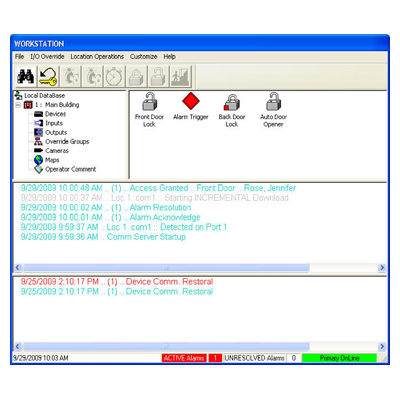
DSX Workstation is the real time user interface for the Comm Server program. It polls the Comm Server program for the current activity and provides alarm monitoring along with input and output control. The Workstation program has both an Event window and an Alarm window. The upper of the two horizontal windows provides a system-monitoring window that displays all system events as they occur. The lower of the two windows is the Alarm window that shows only alarms in the order they occurred and based on priority.
Add to Compare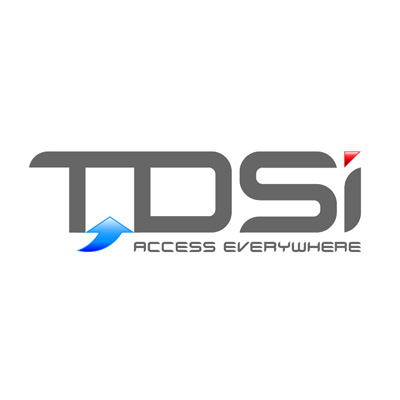
TDSi 5002-5010 is a Mifare programmer allows to control Mifare card security by specifying own sectors and keys to secure site. It can be re-configured to own requirements without any input from TDSi. It also provides a secure method for programming user cards, using a variety of methods with a secure user login function.
Add to Compare
Synergis™ is the IP access control system of the Security Center, Genetec's unified security platform. Organisations choose Synergis to manage cardholders and visitors and to restrict access to high-security areas. Synergis is designed with end-to-end IP connectivity for cost-cutting benefits such as requiring less wiring and allowing for a more efficient installation. Synergis' new built-in visitor management streamlines the enrolment process by allowing operators to quickly and easily check-in visitors by entering their information, assigning a new or existing credential, and printing a badge. Synergis also offers an integrated badge designer for the creation of multiple badge templates (including custom templates) and single-sided or dual-sided badge printing. Synergis' Active Directory Integration feature also helps to centralise the management and synchronisation of Windows user accounts with Synergis' user and cardholder accounts and automate cardholder account creation and deactivation. For more information visit www.genetec.com.
Add to Compare
DSX WinDSX starter/update Kit consists of 1-WinDSX Software CD, 1-Tech Binder and 2-WinDSX User Guides. This version uses Microsoft Accessfor the DataBase engine. Whereas, the WinStart SQL starter/update Kit consists of 1-WinDSX SQL Software CD, 1-Tech Binder, 2-WinDSX User Guides and a USB Features Key. The WinStart SQL uses Microsoft SQL Server as the database engine.
Add to Compare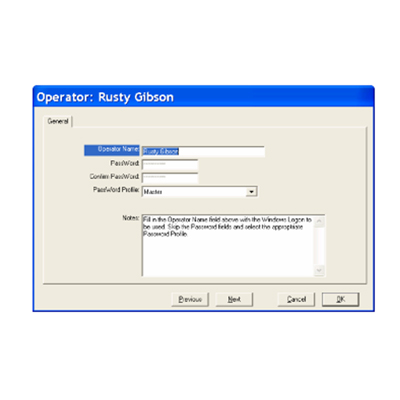
WinDSX SQL can now utilize complex logins and passwords facilitated by Active Directory in Windows™. Operator Logins can be authenticated by Active Directory instead of WinDSX. To configure this, the WinDSX SQL Operators use the same Login Name as they do in Windows™. Their Login name is entered like always under Operator Passwords. The Operator is assigned a Password Profile but is not assigned a Password. When WinDSX SQL receives a login from an operator that does not have a password in it’s database it sends the login request to Active Directory (AD) for authentication. If AD authenticates the operator they are given access to WinDSX SQL according to the Password Profile assigned to them.
Add to Compare
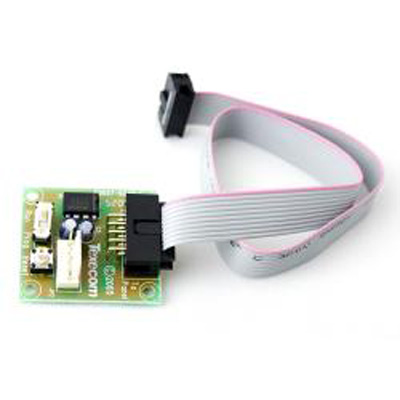
Premier Elite V2.02 firmware is contained within the latest version of Premier Elite Flasher Interface software. The Premier Elite Flasher Interface can be used to update the Premier Elite Control Panels firmware, allowing additional features and functions to be added to existing systems.
Add to Compare
After the initial download of all parameters to the system controllers, the WinDSX software keeps track of what data is changed in each location and automatically downloads only the specific changes to that location. Card Holder updates are almost instantaneous. This Fully Distributed System has speed and efficiency with its intelligent controllers. Changes that are made from a workstation are automatically downloaded to the system controllers even while additional changes are being made. The system controllers continue to operate at full capacity while the database memory allocations are increased to accommodate more doors or additional cardholders.
Add to Compare
The EventCast program will allow other software to receive event messages from the WinDSX software in near real time. These messages can be transmitted via a serial port, or via LAN using UDP. Any or all of thetransmission methods may be used simultaneously.
Add to Compare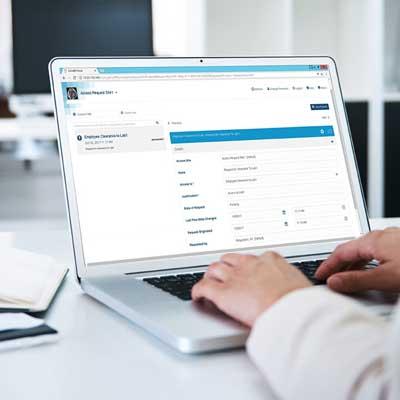
Includes a total of 1,000 unique Approvers/Requesters Sends access requests to the owner of a specified clearance directly thereby streamlining the process Configure multiple levels of approvers and minimum number of approvers per level Define approval hierarchy Specify recurring clearance review activity Escalate missed clearance reviews Reduce workload on security personnel Empower cardholders to make access requests Entrust clearance owners with the control to approve, deny and revoke clearances Maintain security by turning company policies into automated workflows Comprehensive log for review and audit purposes Optionally configure doors to automatically initiate requests upon “access denied” events
Add to Compare
Open Supervised Device Protocol (OSDP) Support: OSDP support for reader to panel communications on iSTAR Ultra Series controllers Ease of use and convenient access: Access C•CURE 9000 from any internet browser with C•CURE IQ web-based client and monitor and control with C•CURE Go mobile app Exceptional scalability: Supports up to 5,000 readers per single server and 60 satellite application server scalability for Enterprise systems Extensive interoperability: Software House Connected Partner Program for standardsbased integrations Business continuity: Enterprise system remains operational throughout upgrade process with multiversion software support Reliability and optimized security: Developed in adherence to the rigorous standards of the Johnson Controls Cyber Protection Product Security Program
Add to Compare
The Two Man Rule requires that two different cardholders use their card before they can gain access to a door. This could be set up for any two card holders or it could be taken a step farther so that a card holder from Group A and one from Group B must both use their card for the door to unlock.
Add to Compare
DSX can accommodate restricting and/or changing Access Levels on the card population without the need for lengthy downloads. This can be done for card control at a university that needs to shut off or restrict access to its student population during the holidays but has different time requirements for the different classes of the student population. It can also be used in Threat Level Management to change the accessibility of the Card Holders. This application is based on the new Time Zone Linking features of the WinDSX 3.7 and higher software. It requires that all controllers in the location have a 1040 processor and firmware version 3129 or higher.
Add to Compare
PC Master allows for LAN communications to each Slave or cluster of Slave Controllers instead of just the Master Controller. This software allows a PC to emulate a Master Controller of a single location and communicate with slave panels using TCP/IP over a LAN/WAN. This is not required for typical PC to Master Controller communications using TCP/IP and a DSX LAN module.
Add to Compare
Includes a total of 1,000 unique Approvers/Requesters Sends access requests to the owner of a specified clearance directly thereby streamlining the process Configure multiple levels of approvers and minimum number of approvers per level Define approval hierarchy Specify recurring clearance review activity Escalate missed clearance reviews Reduce workload on security personnel Empower cardholders to make access requests Entrust clearance owners with the control to approve, deny and revoke clearances Maintain security by turning company policies into automated workflows Comprehensive log for review and audit purposes Optionally configure doors to automatically initiate requests upon “access denied” events
Add to Compare
Additional 10,000 Approvers/Requesters Sends access requests to the owner of a specified clearance directly thereby streamlining the process Configure multiple levels of approvers and minimum number of approvers per level Define approval hierarchy Specify recurring clearance review activity Escalate missed clearance reviews Reduce workload on security personnel Empower cardholders to make access requests Entrust clearance owners with the control to approve, deny and revoke clearances Maintain security by turning company policies into automated workflows Comprehensive log for review and audit purposes Optionally configure doors to automatically initiate requests upon “access denied” events
Add to Compare
Hazmat Lockdown accommodates the quick lockdown of a system required for Hazmat alerts. The Lockdowns occur without the need of programming or lengthy downloads. Hazmat Lockdowns typically secure all the doors in an area or the entire facility not allowing anyone or just particular personnel access in or out. This application is based on the new Time Zone Linking features of the WinDSX 3.7 and higher software. It requires that all controllers in the location have a 1040 processor and firmware version 3129 or higher.
Add to Compare
Includes a total of 1,000 unique Approvers/Requesters Sends access requests to the owner of a specified clearance directly thereby streamlining the process Configure multiple levels of approvers and minimum number of approvers per level Define approval hierarchy Specify recurring clearance review activity Escalate missed clearance reviews Reduce workload on security personnel Empower cardholders to make access requests Entrust clearance owners with the control to approve, deny and revoke clearances Maintain security by turning company policies into automated workflows Comprehensive log for review and audit purposes Optionally configure doors to automatically initiate requests upon “access denied” events
Add to Compare
Additional 100,000 Approvers/Requesters Sends access requests to the owner of a specified clearance directly thereby streamlining the process Configure multiple levels of approvers and minimum number of approvers per level Define approval hierarchy Specify recurring clearance review activity Escalate missed clearance reviews Reduce workload on security personnel Empower cardholders to make access requests Entrust clearance owners with the control to approve, deny and revoke clearances Maintain security by turning company policies into automated workflows Comprehensive log for review and audit purposes Optionally configure doors to automatically initiate requests upon “access denied” events
Add to Compare
SALTO HAMS Excellence is a hotel access management software for control of hotel access and guest management. It can manage upto 16 on line doors and 40,00,000 users. Both guest rooms and back of house doors are managed in one system and it can control both off line and on line units centrally. The software is network ready.
Add to Compare
Small to medium upgrade Sends access requests to the owner of a specified clearance directly thereby streamlining the process Configure multiple levels of approvers and minimum number of approvers per level Define approval hierarchy Specify recurring clearance review activity Escalate missed clearance reviews Reduce workload on security personnel Empower cardholders to make access requests Entrust clearance owners with the control to approve, deny and revoke clearances Maintain security by turning company policies into automated workflows Comprehensive log for review and audit purposes Optionally configure doors to automatically initiate requests upon “access denied” events
Add to Compare
DSX can accommodate keeping a door locked until a card holder is granted access at that same or other door. This prevent s a door(s) that normally unlocks via Time Zone from unlocking on a day when no Card Holders come in such as on a “S now D ay ”. There are several variations to this which are covered below. This application is based on the new Time Zone Linking features of t he WinDSX 3.7 and higher software. It requires that all controllers in the location have a 1040 processor and firmware version 3129 or higher.
Add to Compare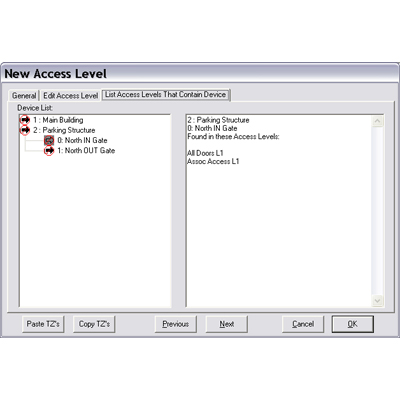
At a time when Accountability and Reporting are an ever increasing requirement, DSX is creating solutionsthat will provide the information needed. Reader (Device) Locator in Access Levels When defining a new access level or editing an existing one there is a new tab that will show the user which access levels contain a selected device. This data is displayed in a text box that can be copied and pasted into any other application for storage, printing, or emailing. This new View streamlines the effort in locating all of the access levels that contain a specific reader.
Add to Compare
The WinDSX HVAC After Hours Zone Control feature can be used in multi-tenant buildings to control and monitor the after hours use of heating and cooling systems in each tenant space. This control gives the administrator the ability to define the amount of extra consumption that each tenant is responsible for. This information can be used to bill the tenants for the correct amount of usage. The HVAC Control feature operates in conjunction with all other WinDSX features simultaneously.
Add to Compare
DSX DSX-HSCS software provides continued availability of system communications and control through the implementation of primary and backup communication server PCs. Available only with WinDSX SQL the Hot-Swap Supervisor runs on the backup comm server and monitors the primary comm server. When the primary fails all communications are redirected to the backup comm server.
Add to Compare
Medium to large upgrade Sends access requests to the owner of a specified clearance directly thereby streamlining the process Configure multiple levels of approvers and minimum number of approvers per level Define approval hierarchy Specify recurring clearance review activity Escalate missed clearance reviews Reduce workload on security personnel Empower cardholders to make access requests Entrust clearance owners with the control to approve, deny and revoke clearances Maintain security by turning company policies into automated workflows Comprehensive log for review and audit purposes Optionally configure doors to automatically initiate requests upon “access denied” events
Add to Compare
Manager First can be used to keep other subordinate issued cards from gaining access to the building when the manager is not on site. Certain access levels would be disabled until a manager arrives and uses their card thereby enabling the access levels of the subordinates.
Add to Compare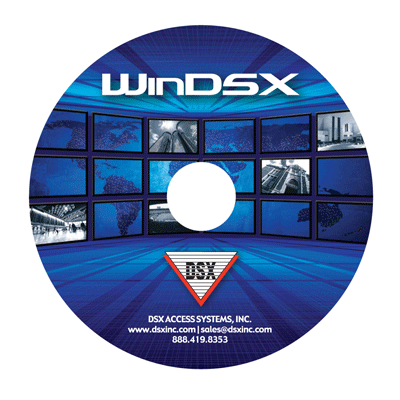
The DSX-SIO L85 Wireless Interface is an interface based on Soft I/O (SIO) that can be used for Wireless Equipment Integration. The SIO L85 leverages Software and Virtual Hardware to accommodate Wireless Locks and Readers. Hundreds or even thousands of Wireless devices can be installed through multiple deployments of L85. Wireless devices are a powerful addition to the DSX Access Control System. The DSXSIO L85 sets the stage for even more flexibility providing a fully integrated solution of both hardwired and wireless readers and locks.Wireless Devices are well suited for applications calling for a large number of doors such as College Dorms or any place where traditional hardware is almost impossible to install due to architectural constraints. High numbers of Low Security Doors with the need of supervision and online management is a strong point for the DSX-SIO L85.DSX-SIO L85 becomes part of any DSX Location through the use of IP/Gateway or a traditional network of controllers to include at least a Master Controller. The SIO L85 then communicates with up to 126 wireless devices mapping those wireless devices to Virtual Devices, Inputs, and Outputs defined in the WinDSX program. There is little difference in the WinDSX program between the hardwired and wireless devices and most operators won't know the difference. Just about any feature in WinDSX also applies to the wireless devices connected through SIO L85.
Add to Compare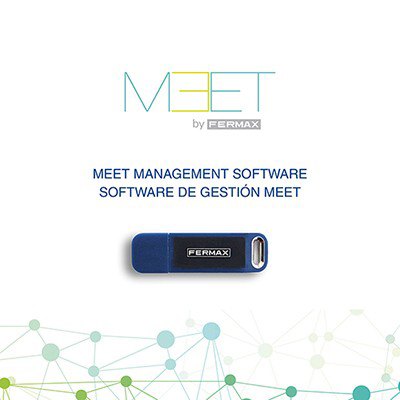
MEET MANAGEMENT SOFTWARE (MMS) is a PC software application especially designed to work as a management and administration centre and optionally perform installer functions.The MEET MMS system is a software application with multiple uses which, firstly, permits the installation and commissioning of the system and, secondly, is the ideal tool to manage the installation in terms of security, comfort and communication for the residents.It performs the following functions: Message send to monitors Management of alarm warnings and panic calls It performs configuration functions Communication event log Access control event log and management Alarm event log and configuration Face recognition image upload Online devices monitoring Users and devices database management Device configuration push
Add to Compare