Access Control Softwares (677)
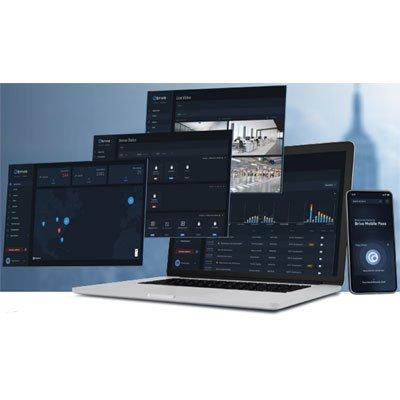
APPLICATIONS & BENEFITS Access Control Visibility Data visualization capability with intuitive user-friendly interface Event tracking of door activity and active users with alert settings and reporting features Event classification to organize activity by critical action required Device status read-out in access control solution User and credential management as well as group access permission management Lockdown feature to secure the facility in an emergency Live and recorded video capture and indexing Flexibility and Control Mobile credentials to modernize workforce and facility Remote and mobile management to control from any device and from anywhere Role-based permissions Event and user access automation and scheduling Automated user access privileges and ability to schedule events Identity Access Management to tie user physical security access rights to online access Infinite scalability to grow Site and door management to set up building access perimeter and interior doors Data Analytics and Insight Data Explorer business intelligence tool built into the platform for advanced analytics Global View map-centric multi-site display to zoom into individual facilities to assess usage patterns and risks Hundreds of API integrations to expand connectivity and develop ecosystem Event trend analysis automatically identifies patterns and anomalies in the access data to surface potential issues and confirm if the event is normal or anomalous
Add to Compare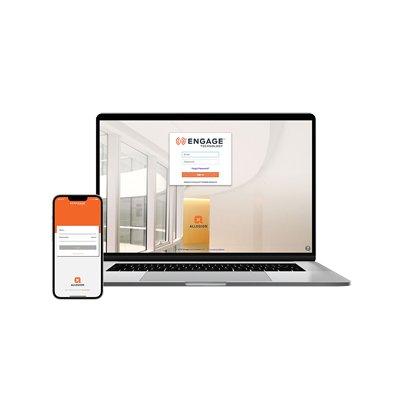
ENGAGE cloud-based web and mobile applications are ideal for basic access control within small businesses and multifamily properties. Connect compatible devices over Wi-Fi for periodic updates or use No-Tour which enables Schlage smart and mobile credentials to deliver updates to devices. ENGAGE for access control supports Schlage Control®, NDE, LE, and CTE with MTB readers as well as Von Duprin RU and RM.
Add to Compare
NordLayer provides businesses of all sizes with flexible and user-friendly network security solutions that meet the high standards set by NordVPN. The aim is to simplify network security for organizations, enhancing internet safety while modernizing access to networks and resources. Hassle-Free Network Security NordLayer is designed to make network security a seamless experience. By leveraging advanced technology that adheres to top regulatory standards, it enhances overall internet security. Key Features of NordLayer Security Service Edge (SSE) Principles NordLayer prioritizes Security Service Edge (SSE) principles to offer comprehensive security solutions. It incorporates: Zero Trust Network Access (ZTNA): Ensuring that only authorized users have access to sensitive resources. Secure Web Gateway (SWG): Protecting against online threats and enforcing security policies. Firewall as a Service (FWaaS): Providing robust firewall capabilities without the need for physical hardware. Identity Access Management (IAM): Managing user identities and access rights effectively. Compliance Made Easy To assist businesses on their compliance journey, NordLayer offers tools that support adherence to various regulatory standards, including: HIPAA GDPR PCI-DSS ISO 27001 SOC 2 Type 1 & Type 2 NIS2 Directive Cyber Essentials Key features such as data in transit encryption, access control, and network segmentation help organizations achieve these compliance goals. Seamless Integration and Scalability NordLayer is designed for seamless integration into existing infrastructures. With a hardware-free setup and a focus on scalability, it’s an ideal solution for agile businesses and distributed workforces. NordLayer adapts effortlessly to the diverse growth pace and ever-changing cybersecurity needs of modern organizations. Pricing Lite plan. Essential internet access security with basic internet threat prevention features at $10/user on a monthly subscription or $96 per year, saving $24. Core plan. A suite of advanced internet access security & basic network access control solutions at $14/user on a monthly subscription or $132 per year, saving $36. Premium plan. A powerful blend of network access control solutions with more granular network segmentation and the ability to interconnect sites & devices at $18/user on a monthly subscription or $168 per year, saving $48. Enterprise offer. Custom-fit network security for teams with over 50 seats, providing clarity and flexible pricing, starting at $7 per user per month.
Add to Compare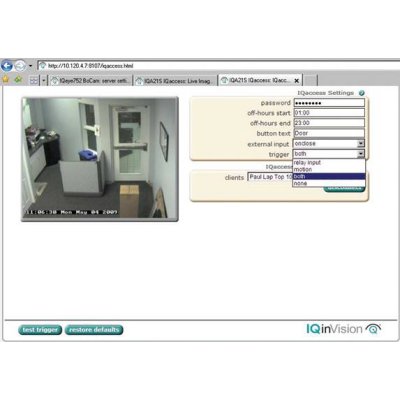
Whenever IQaccess is triggered, a video alert window pops up in every IQaccess enabled PC and lets the first responder open the door, activate the alarm, turn on the lights or control any other device you may have connected to your IQeye PRO LINE camera's relay output.IQaccess features: Field upgradeableUp to 8 local or remote usersFree downloadable client software"After Hours" schedulingPassword protectedTriggered by External Device or On-camera Motion DetectionLow-processing requirementWorks seamlessly with NVRs and IQrecorder Easy installation IQaccess is simple to install and operate - simply upgrade your IQeye PRO LINE camera, install the client software, register the cameras and you are done! You can even have IQaccess trigger your home PC. Most popular applicationsIQaccess is perfect as a notification tool to alert the staff when a client or customer is waiting or is somewhere they shouldn't be. It's also a perfect tool for verifying who is at the door before letting them in. Key applications include:Retail shops Healthcare facilities and campusesHotel front desk areaCorporate officesEducational facilitiesIQaccess is available with the following IQeye PRO LINE cameras:IQeye Sentinel™ SeriesThe first all-weather, megapixel IP network camera that is entirely Power-over-Ethernet. This vandal and tamper-resistant surveillance camera features easy installation with flexible mounting options for wall, ceiling, or parapet.Features:IP 66 / NEMA 5 environmental rating-22°F/-30°C to +122°F/50°C1.3 Megapixels @ 30 fps2.0 Megapixels @ 20 fps3.1 Megapixels @ 12 fps5.0 Megapixels @ 10 fps64 independent video streams with IQcameo<0.05 Lux IR sensitive (Day/Night series)Multistream low BW + Hi ResolutionIEEE 802.3af ~ Power-over-Ethernet360° + Pan, 180° + TiltDigital image cropping for bandwidth optimizationIQeye Alliance™ SeriesThe first fully integrated, Power-over-Ethernet megapixel dome camera line that features solid construction, convenient installation features like a unique pivoting shroud and high-quality video images and network performance.Features:Vandal-resistant, low profile surface mount housingInterior or exterior security video solutionOptional H.264 with audioFull 3-axis gimbal with pivoting, hinged lens shroud64 independent video streams with IQcameoAnalog video out for installation / set-upExtra analogue video for public view monitorSDHC card slot for on-camera storageVGA resolution @ 30 fps1.3 Megapixels @ 15 fps 2.0 Megapixels @ 15 fps3.1 Megapixels @ 12 fps5.0 Megapixels @ 10 fpsLIGHTGRABBER II low-light featureIEEE 802.3af - Power-over-EthernetLow 2.5 watts power consumptionPrivacy zones, digital image croppingAdjustable exclusion zones for harsh lighting conditionIQeye700/750 SeriesThese full-featured megapixel network cameras deliver best-in-class image quality, dynamic range, and exceptional low-light and day-night performance with network stability you can rely on in the most challenging environments.Features:1.3 Megapixels @ up to 30 fps2.0 Megapixels @ up to 20 fps3.1 Megapixels @ up to 12 fps5.0 Megapixels @ up to 10 fps64 independent video streams with IQcameo<0.05 Lux IR sensitive (750 Series)MultiStream low BW + Hi Resolution IEEE 802.3af - Power-over-EthernetPublic View Port™ Analogue outputCF slot for on-camera recordingLIGHTGRABBER II™ low-light feature
Add to Compare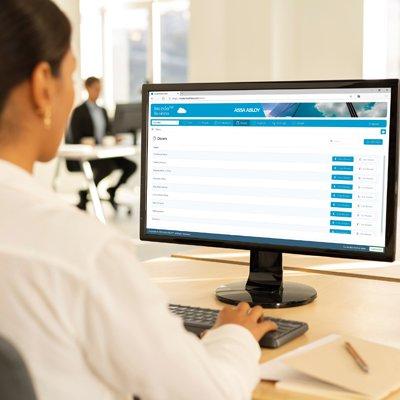
There are many challenges facing businesses of every type and scale, these include hybrid working, efficient use of multiple rooms and reducing energy consumption. Security that is agile and futureproof helps to address them. These challenges are greatest for small or medium sized organisations where flexibility is key. ASSA ABLOY are able to offer a huge, diverse range of door hardware, all from one manufacturer, commissioning or extending control becomes more streamlined and cost-efficient. Flexible control for security, agility and efficiency A modern access control solution should offer a wide range of digital locks and credentials, allowing a business to manage their workspaces and workflows with maximum efficiency. ASSA ABLOY’s Incedo access control solutions were designed for this purpose, with the option to upgrade to the Cloud. When they choose Incedo, organizations secure almost any opening with offline electronic locks or in real time with online devices. They issue building users with credentials of their choice. And they manage everything from one place, via the flexible, scalable, intuitive Incedo platform. It is easy to get started with Incedo. Businesses choose from a vast range of hardware. Doors, cabinets, gates, server racks and almost any other opening may be locked with a wireless or wired device. Building users gain access via smartcards, mobile keys stored on their smartphone, or battery-free smart keys. Our range of credentials can be used across our vast hardware choices. Incedo software manages this hardware and the security of users — in the cloud, if required. Hardware and software installations are easy, with no complex integrations required. The entire ecosystem is modular, designed for simple adoption and easy expansion at any time and in any direction. Incedo leaves business owners with more time to focus on their main task: the business.
Add to Compare
The LEGIC access™ Standard is based on an open LEGIC data structure (LEGIC access segment) and standardises person identification for access and time & attendance in companies. It ensures the compatibility of access and time & attendance applications between different license partners. Additionally, it increases the multi-application capability of the respective projects using LEGIC technology.
Add to Compare
TITAN is a true 32-bit access control application that provides Windows interface for management, control and monitoring of the entire Challenger range of products. These include access control, alarm monitoring, HVAC, lighting control as well as video imaging system. Some of the other features of the system are: full upload and download capabilities; alarm handling, monitoring and control via graphics maps; Smart Card programmer facilities for the creation, programming and loading of Tecom Smart Cards and Readers; Alarm handling through a 2 tier response process with individual programmable instructions; flexible database and history reporting schedule and support of multiple card reader technologies.
Add to Compare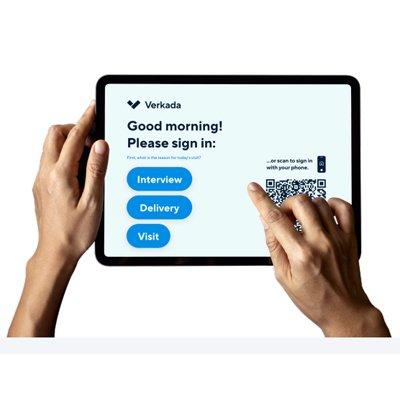
Integrate with Verkada Cameras & Access Control Role-based permissions Customizable visitor experience Touchless check-in Calendar invitations Document signing Badge printing Automatic arrival notifications Analytics and reporting Security Screening
Add to Compare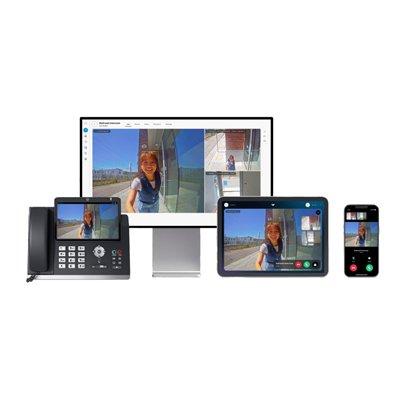
Verkada Command offers a web browser-based interface for designated users to monitor live feeds, receive calls, and respond with one-tap controls from virtually anywhere, any device. Receivers can also field numerous concurrent calls in Command: they can easily view all incoming calls, see how long the caller has been waiting, and know if anyone else has responded to the call. With this information, receivers can prioritize which calls to answer and which calls to place on hold.
Add to Compare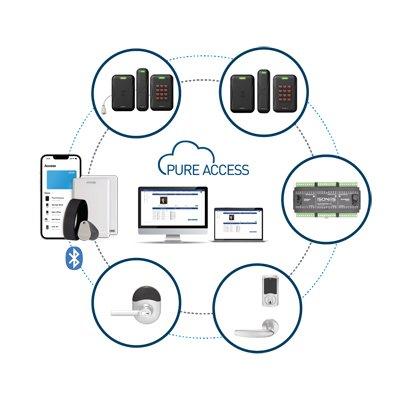
Real time monitoring, customizable dashboards and live alerts Full reporting suite Web API Fully hosted access control platform Custom rules engine Partitioned tenants with defined areas Predefined and customizable user roles and permissions
Add to Compare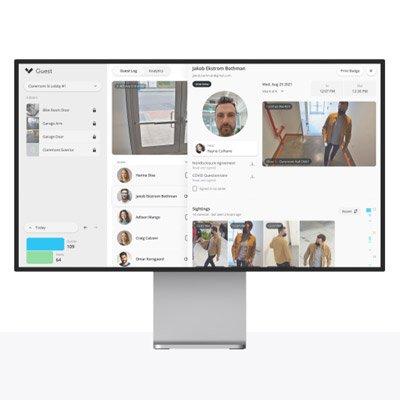
10-year Guest visitor management system licence Centralised guest management across all locations Verkada Access Control integration Verkada Camera integration Guest tracking within Command platform Remote door unlock Unlimited users, visitors and sign-ins Touchless sign–in Self sign-out Custom branding Document signing Instant host notifications Photo capture Badge printing Detailed guest logs Role–based permissions and settings Site–specific host lists Centralised dashboard Real–time analytics Exportable reports Dedicated support
Add to Compare
Verkada Desk Station is an iPad-based application that allows receptionists, guards, and other stationed professionals to monitor live feeds, and easily respond to calls with one tap. Organizations can pair an unlimited number of intercoms to their tablet and view up to four intercoms or neighboring cameras at once. Receivers can also step away from their station with a “Here/Away” button that will program calls to automatically skip the Desk Station when toggled and ring whoever is next in the call flow.
Add to Compare
Brivo Systems LLC, leader in cloud applications for security management, recently announced the company’s release of Brivo OnAirSM version 10.11, featuring an updated User Interface (UI). Brivo OnAir is the new brand name for the former Brivo ACS WebService cloud-based access control management solution. With the introduction of this updated interface, Brivo further extends its leadership in the cloud-based access control and video surveillance space by offering a more visually rich and responsive experience for its customers. The Brivo OnAir interface is streamlined and designed for usability, reducing the learning curve and simplifying both system deployment and day-to-day security management. For the redesign project, Brivo engaged a team of user experience (UX) experts. The team conducted hundreds of hours of interviews with current and prospective users to determine how they worked. They incorporated this information into profiles of user “personas” in order to bring focus to ensuring that the resulting interface responded to the needs of Brivo’s users. This first phase of the interface re-design incorporates the key findings from this process and sets the stage for additional enhancements to follow. “This is an exciting day for Brivo, our channel partners and end-users,” said John Szczygiel, Executive Vice President. “The Brivo OnAir name better captures the essence of our cloud-based solution. The revamped UI directly reflects feedback from our users and further demonstrates our commitment to continuous improvement. What's more, this major upgrade is delivered automatically and without charge to all of our users. That’s cloud computing, that’s Brivo OnAir.” Among the features the Brivo OnAir version 10.11 offers: A rich user experience that maximises video and access control management. A new top-level video tab provides immediate access to recorded and live Online Video Recorder (OVR) video. Simplified search capability provides a comprehensive view of access and video motion events on a timeline display; events are visually represented and prioritised using color coding, intuitive icons and other visual cues. The system landing page is optimised to provide shortcuts for everyday operations: create a new user, find a user or a card, change passwords and search video all on this page—saving time navigating through multiple screens.
Add to Compare
1-year Guest visitor management system licence Centralised guest management across all locations Verkada Access Control integration Verkada Camera integration Guest tracking within Command platform Remote door unlock Unlimited users, visitors and sign-ins Touchless sign–in Self sign-out Custom branding Document signing Instant host notifications Photo capture Badge printing Detailed guest logs Role–based permissions and settings Site–specific host lists Centralised dashboard Real–time analytics Exportable reports Dedicated support
Add to Compare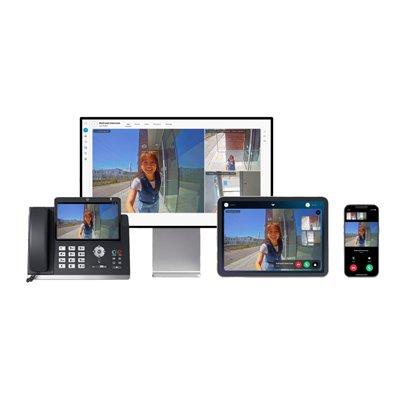
Powered by Bluetooth Low Energy (BLE), Verkada Pass is a mobile app that allows designated users to receive intercom calls and respond on the go, even if they are away from an entryway or computer. Designated users can access the app on both iOS and Android devices and easily use one-tap controls to admit visitors. Outside of call receiving, employees in proximity of the intercom’s built-in card reader can also use the app to unlock doors and enter buildings.
Add to Compare
3-year Guest visitor management system licence Centralised guest management across all locations Verkada Access Control integration Verkada Camera integration Guest tracking within Command platform Remote door unlock Unlimited users, visitors and sign-ins Touchless sign–in Self sign-out Custom branding Document signing Instant host notifications Photo capture Badge printing Detailed guest logs Role–based permissions and settings Site–specific host lists Centralised dashboard Real–time analytics Exportable reports Dedicated support
Add to Compare
5-year Guest visitor management system licence Centralised guest management across all locations Verkada Access Control integration Verkada Camera integration Guest tracking within Command platform Remote door unlock Unlimited users, visitors and sign-ins Touchless sign–in Self sign-out Custom branding Document signing Instant host notifications Photo capture Badge printing Detailed guest logs Role–based permissions and settings Site–specific host lists Centralised dashboard Real–time analytics Exportable reports Dedicated support
Add to Compare
OVR WebService significantly extends Brivo’s ACS WebService, providing centralized video storage alongside hosted access control. View live or event-related video at a fraction of the cost of traditional hardware DVRs. OVR WebService is available to all of Brivo’s ACS WebService customers.
Add to Compare
The Software Development Kit – the DevPack – and its components form the basis for every efficient RFID access control solution. With it, you can modify the standard configuration of ELATEC readers in virtually any way you’d like. These provide optimizations and security modifications as well as new functionalities. Director Tool - It can verify the functionality and functional scope of readers, check interplay and tracking with other components or tags, and test interfaces. Tool for antenna development - Development and customization of your specific antennas for TWN products with external antennas, such as the TWN4 Core or TWN4 Nano module. Tech Tracer Tool - Responsible for the analysis of transponders for tracking and identification of transponder technologies. Flash Tool - Supports the obligatory configuration and programming. Transponder Memory Dump - This tool reads the transponder data content.
Add to Compare