Access Control Accessories (1,597)


The R400 MA comes with 24 individual beam paths. The large number of beam paths gives even greater accuracy of detection and reduces the chances of false activations of the barrier arms. The Fastlane R400 MA features anti-crawl beams to detect anyone trying to gain entry by crawling under the barrier arms. This unit features interchangeable vanity tops, giving a virtually unlimited choice of materials, to easily blend the unit in to the fabric of the building. Integral card reader mounting options are available to give the most discreet overall finish possible. The use of Cat 5 interconnections between the pedestals simplifies and speeds up installation.
Add to Compare
The Fastlane Channel provides a rounded symmetrical look for customers who require a discreet security presence. The stainless steel ends can be painted or produced in various types of material, such as stone, metal and wood, to complement different interior design concepts. The Channel is supplied with a clear text display for user instructions and with a quick release base for easy temporary removal.
Add to Compare
The Fastlane Clearstyle provides the most discreet form of security possible and exceeding the most demanding architects’ design requirements. Clearstyle blends right in to the fabric of the building, delivering the perfect combination of security and aesthetics. The construction is a combination of stainless steel and clear Perspex panels. The stainless steel end sections can be provided in a variety of finishes to ensure a perfect match with the building’s surroundings.
Add to Compare


Continuously adjustable holding force Correct closing sequence guaranteed for double leaf doors, inactive leaf closes before active leaf starts to close Standard mounting position on hinge side and non-hinge side Non-hinge side mounting requires hook arm G120 Axis continuoulsy height adjustable up to 14 mm Large range of applications Hold-open angle adjustable between 70°-130° on hinge side and 70°-120° on non-hinge side Certified in compliance with EN1154, EN1155 and EN1158, size 3-6 Suitable for fire and smoke protection double leaf doors, hinge distance 1350 - 2800 mm, non-hinge side installation hinge distance 1400 - 2800 mm
Add to Compare
Continuously adjustable holding force Correct closing sequence guaranteed for double leaf doors, inactive leaf closes before active leaf starts to close Standard mounting position on hinge side and non-hinge side Non-hinge side mounting requires hook arm G120 Axis continuoulsy height adjustable up to 14 mm Large range of applications Hold-open angle adjustable between 70°-130° on hinge side and 70°-120° on non-hinge side Certified in compliance with EN1154, EN1155 and EN1158, size 3-6 Suitable for fire and smoke protection double leaf doors, hinge distance 1350 - 2800 mm, non-hinge side installation hinge distance 1400 - 2800 mm
Add to Compare

Fulfils barrier-free building requirements (EA / CEN TR 15894) Certified in compliance with EN 1154, size 3-6 Concealed door closer with Cam-Motion® technology and slim standard concealed guide rail G896 or standard concealed guide rail G897 For single action doors up to 1400 mm wide Suitable for fire and smoke protection doors
Add to Compare
Can be used with integrated concealed mounting plate, suitable for fire and smoke protection doors Can be used for left and right-handed doors 14 mm height adjustable Closing speed, latching speed and backcheck adjustable via front facing regulating valves Thermodynamic valves for consistent performance Variable adjustable closing force Opening angle up to 180° For heavy door applications Certified in compliance with EN1154, size 5-7 For single action doors with a width of up to 1600 mm
Add to Compare
The Fastlane R300 MA has been designed to provide a similar level of security as a traditional 1/2-height turnstile but with all the convenience and aesthetic advantages synonymous with the Fastlane brand. This unit features interchangeable vanity tops, giving a virtually unlimited choice of materials, to easily blend the unit in to the fabric of the building. Integral card reader mounting options are available to give the most discreet overall finish possible. The use of Cat 5 interconnections between the pedestals simplifies and speeds up installation. Fastlane plus is designed to ensure only one person gains access for each authorised card presented. The system uses active infra-red beams to create an invisible electronic field between two pedestals.
Add to Compare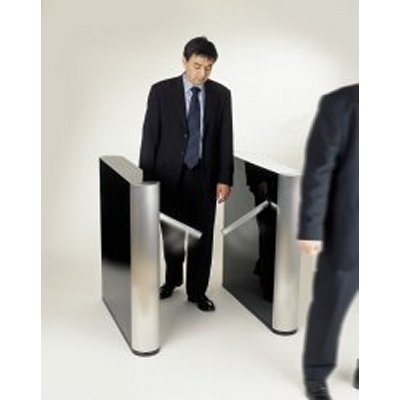
Fastlane plus, from Integrated Design, is the very latest in high tech entrance control systems, combining the best of optical turnstile and physical barrier technology. Optical turnstile with integrated barriers Stops all unauthorised entry attempts Fast throughput Physical and visual deterrent Compact aesthetic design Compliant with UK Disabilities Act
Add to Compare
44/45mm solid hardwood/lamelled core and exterior facings. Quality timber facing veneers: Ash, Mahogany, Oak etc. Hardwood lippings are fitted to all four edges. Min 95mm x 70mm solid hardwood section. Hinges: 3no, Heavy duty, fire rated, stainless steel hinges. Single point locking with appropriate level/door furniture.
Add to Compare
Door 68mm solid hardwood/lamelled core with two steel sheet inserts and exterior timber facings. 1 hour fire resistance can be achieved with the inclusion of the appropriate intrumescent seals. Quality timber facing veneers: Ash, Mahogany, Oak etc. Hardwood lippings are fitted to all four edges. Min 120mm x 70mm solid hardwood section. Hinges - 4no. Heavy duty, fire rated, steel hinges. Concealed lock keep reinforcement providing further protection to the locking point. No 3 Hinge bolts providing greater strength and protection to hinge side of the door frame.
Add to Compare
54mm solid hardwood/lamelled core and exterior facings. 1 hour fire resistance can be achieved with the inclusion of the appropriate intrumescent seals. Quality timber facing veneers: Ash, Mahogany, Oak etc. Hardwood lippings are fitted to all four edges. Min 95mm x 70mm solid hardwood section. Solid stainless steel continuous hinge. Concealed lock keep reinforcement providing further protection to the locking point. No 2 Hinge bolts providing greater strength and protection to hinge side of the door frame.
Add to Compare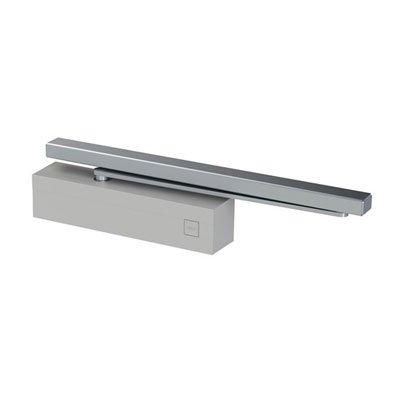
Suitable for external and internal doors CE certified with sliding arm Adjustable closing force size EN 1-6 with sliding arm according EN 1154 Back check (BC) as a standard feature Adjustable latching and back check starting angle by grooved spindle Easy adjustment of arm height (14 mm) Two pressure relief valves to protect against overload Maximum door weight 120 kg and door width 1400 mm with sliding arm installation Easy to install
Add to Compare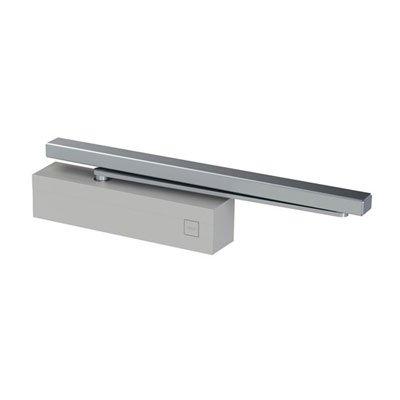
Suitable for external and internal doors CE certified with sliding arm Adjustable closing force size EN 1-4 with sliding arm according EN 1154 Back check (BC) as a standard feature Adjustable latching and back check starting angle by grooved spindle Easy adjustment of arm height (14 mm) Two pressure relief valves to protect against overload Maximum door weight 80 kg and door width 1100 mm with sliding arm installation Easy to install
Add to Compare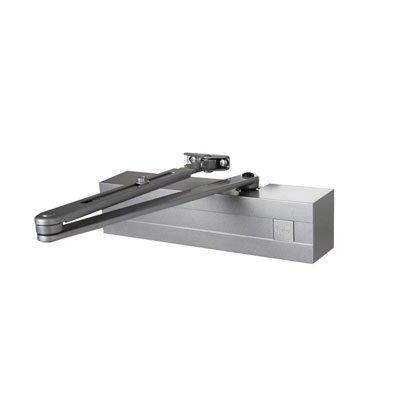
Suitable for external and internal doors CE certified with standard arm Adjustable closing force size EN 3-5 with standard arm according EN 1154 Back check (BC) as a standard feature Adjustable latching and back check starting angle by grooved spindle Easy adjustment of arm height (14 mm) Two pressure relief valves to protect against overload Maximum door weight 100 kg and door width 1250 mm Easy to install
Add to Compare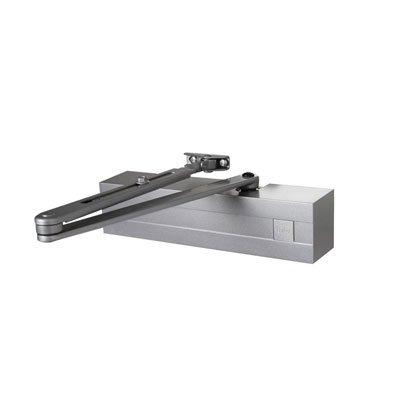
Can be used with integrated concealed mounting plate, suitable for fire and smoke protection doors Can be used for left and right-handed doors Axis height-adjustable up to 14 mm Thermodynamic valves for consistent performance For heavy door applications Closing speed, latching speed and backcheck adjustable via front facing regulating valves Variable adjustable closing force Opening angle up to 180° Certified in compliance with EN1154 Suitable for fire and smoke protection doors For single action doors with a width of up to 1600mm
Add to Compare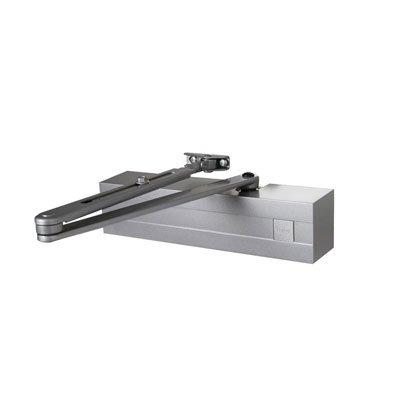
Can be used with height-adjustable sliding rail or standard arm Suitable for external and internal doors CE certified with sliding arm and standard arm Adjustable closing force size EN 1-4 (DC240DA: EN 2-4) with sliding arm according EN 1154 Adjustable closing force size EN 2-6 with standard arm according EN 1154 Back check (BC) as a standard feature Adjustable latching and back check starting angle by grooved spindle Easy adjustment of arm height (14 mm) Two pressure relief valves to protect against overload Maximum door weight 120 kg and door width 1400 mm with standard arm installation Maximum door weight 80 kg and door width 1100 mm with sliding arm installation Easy to install
Add to Compare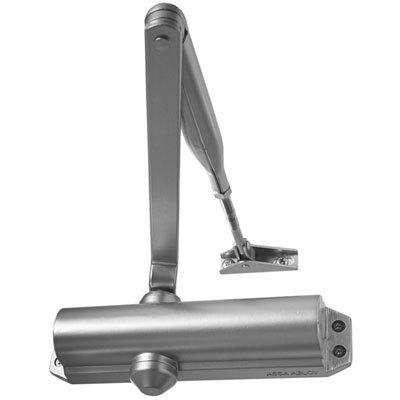
Certified in compliance with EN 1154 For single action doors up to 1100 mm wide Can be used for left and right-handed doors Closing speed, latching speed and backcheck continuously adjustable using regulating valves Thermodynamic valves for consistent performance Closing force configurable Opening angle up to 180°
Add to Compare
Can be used with height-adjustable sliding rail or standard arm Suitable for external and internal doors CE certified with sliding arm and standard arm Adjustable closing force size EN 2-4 with sliding arm according EN 1154 Adjustable closing force size EN 2-6 with standard arm according EN 1154 Back check (BC) as a standard feature Delayed action Adjustable latching and back check starting angle by grooved spindle Easy adjustment of arm height (14 mm) Two pressure relief valves to protect against overload Maximum door weight 120 kg and door width 1400 mm with standard arm installation Maximum door weight 80 kg and door width 1100 mm with sliding arm installation Easy to install
Add to Compare
Stamped steel chassis and cast zinc chassis cover Fits all standard 1-3/4" door types Available finishes: 689, 613E, 630 BHMA Certified Grade 1 Ideal for exit device retrofits of current solution replacements or upgrades Hand reversible
Add to Compare
Stamped steel chassis and cast zinc chassis cover Fits all standard 1-3/4" door types Available finishes: 689, 613E, 630 BHMA Certified Grade 1 Ideal for exit device retrofits of current solution replacements or upgrades Hand reversible
Add to Compare
Stamped steel chassis and cast zinc chassis cover Fits all standard 1-3/4" door types Available finishes: 689, 613E, 630 BHMA Certified Grade 1 Ideal for exit device retrofits of current solution replacements or upgrades Hand reversible
Add to Compare
Stamped steel chassis and cast zinc chassis cover Fits all standard 1-3/4" door types Available finishes: 689, 613E, 630 BHMA Certified Grade 1 Ideal for exit device retrofits of current solution replacements or upgrades Hand reversible
Add to Compare
Stamped steel chassis and cast zinc chassis cover Fits all standard 1-3/4" door types Available finishes: 689, 613E, 630 BHMA Certified Grade 1 Ideal for exit device retrofits of current solution replacements or upgrades Hand reversible
Add to Compare
Stamped steel chassis and cast zinc chassis cover Fits all standard 1-3/4" door types Available finishes: 689, 613E, 630 BHMA Certified Grade 1 Ideal for exit device retrofits of current solution replacements or upgrades Hand reversible
Add to Compare
Stamped steel chassis and cast zinc chassis cover Fits all standard 1-3/4" door types Available finishes: 689, 613E, 630 BHMA Certified Grade 1 Ideal for exit device retrofits of current solution replacements or upgrades Hand reversible
Add to Compare
Stamped steel chassis and cast zinc chassis cover Fits all standard 1-3/4" door types Available finishes: 689, 613E, 630 BHMA Certified Grade 1 Ideal for exit device retrofits of current solution replacements or upgrades Hand reversible
Add to Compare